
Input sources only when needed
Add a foreign-language input source only when you need it, and remove it when you're done.
Coming soon to the Mac App Store
Requires macOS 26 or later
One click in the menu bar instead of a trip through System Settings.
System Settings
Adding and removing a foreign-language input source in System Settings takes too many steps. But leave one in place for occasional use, like studying a language, and it gets in your way every time you switch input sources.
LangToggle
With LangToggle, add it from the menu bar with one click when you need it, and remove it just as quickly when you're done. Just register the input sources you use now and then, and a checkmark shows which ones are currently added.
Only the ones you use now and then
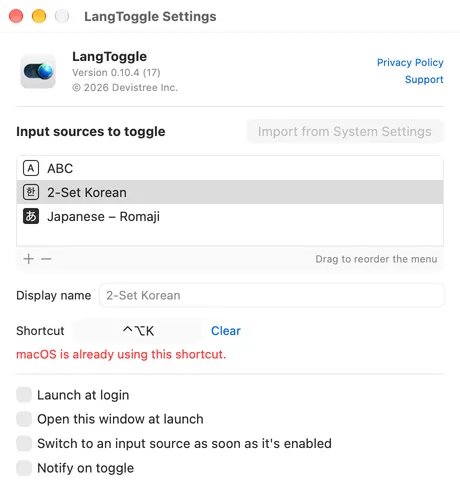
Only the input sources you register appear in the menu. Rename them and drag to reorder.

Pick by language, like System Settings
Find a language and choose from its input sources — keyboard layouts, input methods and trackpad handwriting.
A shortcut for each, with conflict warnings
Toggle from any app without opening the menu. You're warned when macOS already uses the shortcut.
Features
- Add or remove an input source with one click in the menu bar
- A global shortcut for each input source — toggle it from any app without opening the menu. F13–F20 work without modifier keys
- Warns you when a shortcut is already used by macOS, based on your current settings rather than the defaults
- Optionally switch to an input source as soon as it's added
- Optional notification on each toggle, so you see the result even when you use a shortcut
- Custom display names and drag-to-reorder
- Import from System Settings — register the input sources you already use in one step
- Works with macOS keyboard layouts, input methods such as Japanese, Chinese and Korean, and trackpad handwriting (Chinese Simplified, Chinese Traditional, Cantonese)
- Launch at login (optional, off by default)
Switching between input sources you've already added is built into macOS, so LangToggle leaves that alone.
Built to stay out of your way
- Never removes your last remaining input source
- No Accessibility permission needed — LangToggle doesn't intercept keystrokes
- Collects no data and never connects to the network
- Available in English, Korean, Japanese, Chinese (Simplified and Traditional), Spanish, French and German

LangToggle
Input sources only when needed
Coming soon to the Mac App Store
Requires macOS 26 or later